> ## Documentation Index
> Fetch the complete documentation index at: https://specterops-fetch-json-component.mintlify.site/llms.txt
> Use this file to discover all available pages before exploring further.
# Use the Splunk SOAR integration for BloodHound Enterprise
> Learn how to use the BloodHound Enterprise Splunk SOAR app to view attack path findings in Splunk SOAR.
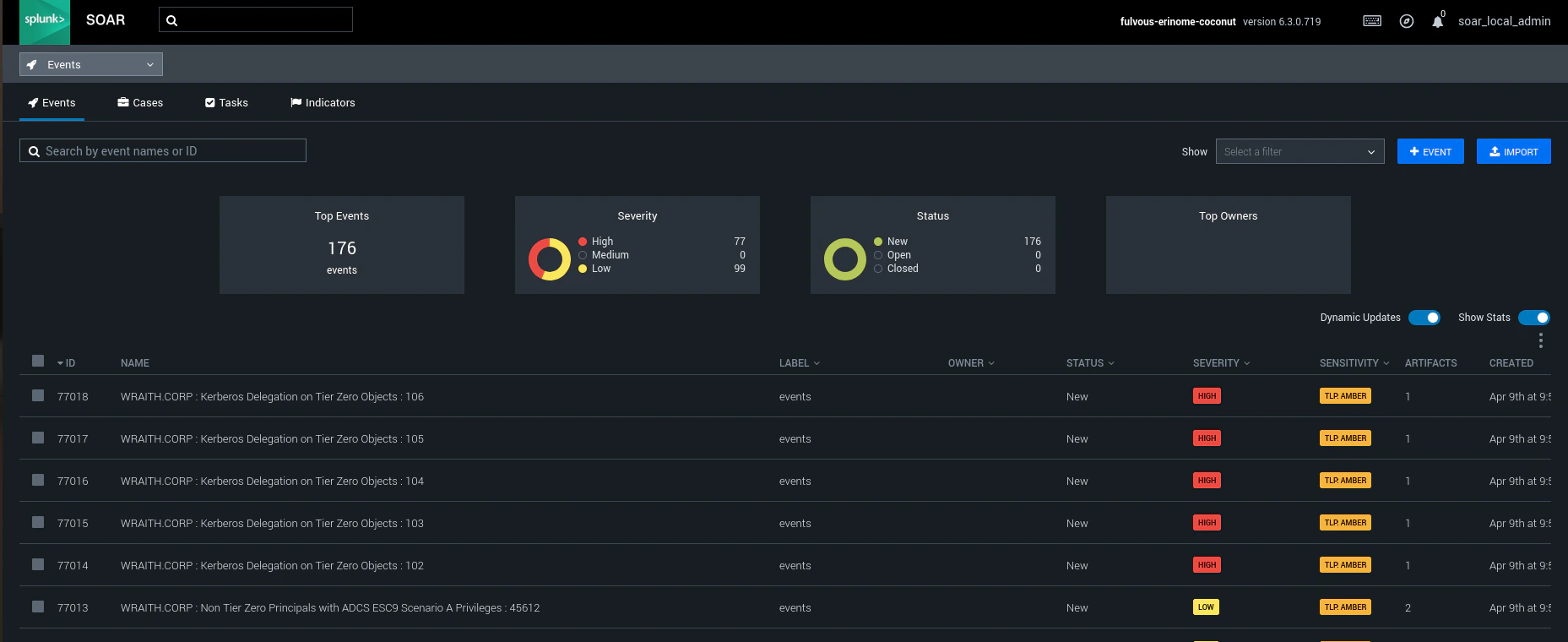
 After installation and configuration are complete, you can view attack path findings from BloodHound Enterprise in Splunk SOAR. This allows you to monitor potential attack paths in real-time and trigger automated response playbooks based on BloodHound Enterprise detections.
To view attack path findings from BloodHound Enterprise in Splunk SOAR:
1. Log in to your Splunk SOAR instance.
2. Click the **Events** tab to view all polled events.
After installation and configuration are complete, you can view attack path findings from BloodHound Enterprise in Splunk SOAR. This allows you to monitor potential attack paths in real-time and trigger automated response playbooks based on BloodHound Enterprise detections.
To view attack path findings from BloodHound Enterprise in Splunk SOAR:
1. Log in to your Splunk SOAR instance.
2. Click the **Events** tab to view all polled events.
 See the [Splunk SOAR documentation](https://help.splunk.com/en/splunk-soar/soar-cloud/use-soar-cloud/introduction/about-splunk-soar-cloud) for more information about working with events.